ML Pro: A Link Building Platform That Reads Your Site First

Author

Tijana Stankovic
Marketing Manager
Most link building platforms start the same way: you get a spreadsheet of thousands of rows, a DR slider and good luck. You spend an hour filtering, then another hour checking whether the "tech blog" with DR 62 covers anything near your niche.
With Motherlink Pro (ML Pro), our link building platform, we flipped the order. You paste your URL, and the platform reads your site before it shows you a single website.
TL;DR
ML Pro analyses your site in about 20 seconds. Kira, the built-in AI concierge, then gives you a scored shortlist of vetted websites with a plain-English reason for each pick.
A personal SEO manager sits in the same chat, so you can do everything yourself or press "Let my manager decide" and only approve the result.
After you order you can track every placement from brief to live link, and regular metric emails show your DR, traffic and referring domains before and after.
Here's what happens after you sign up, step by step.
Step 1: Sign up and paste your website
Setup asks three questions: are you a business owner or an SEO professional, what brought you here, and what's your website. That's all.
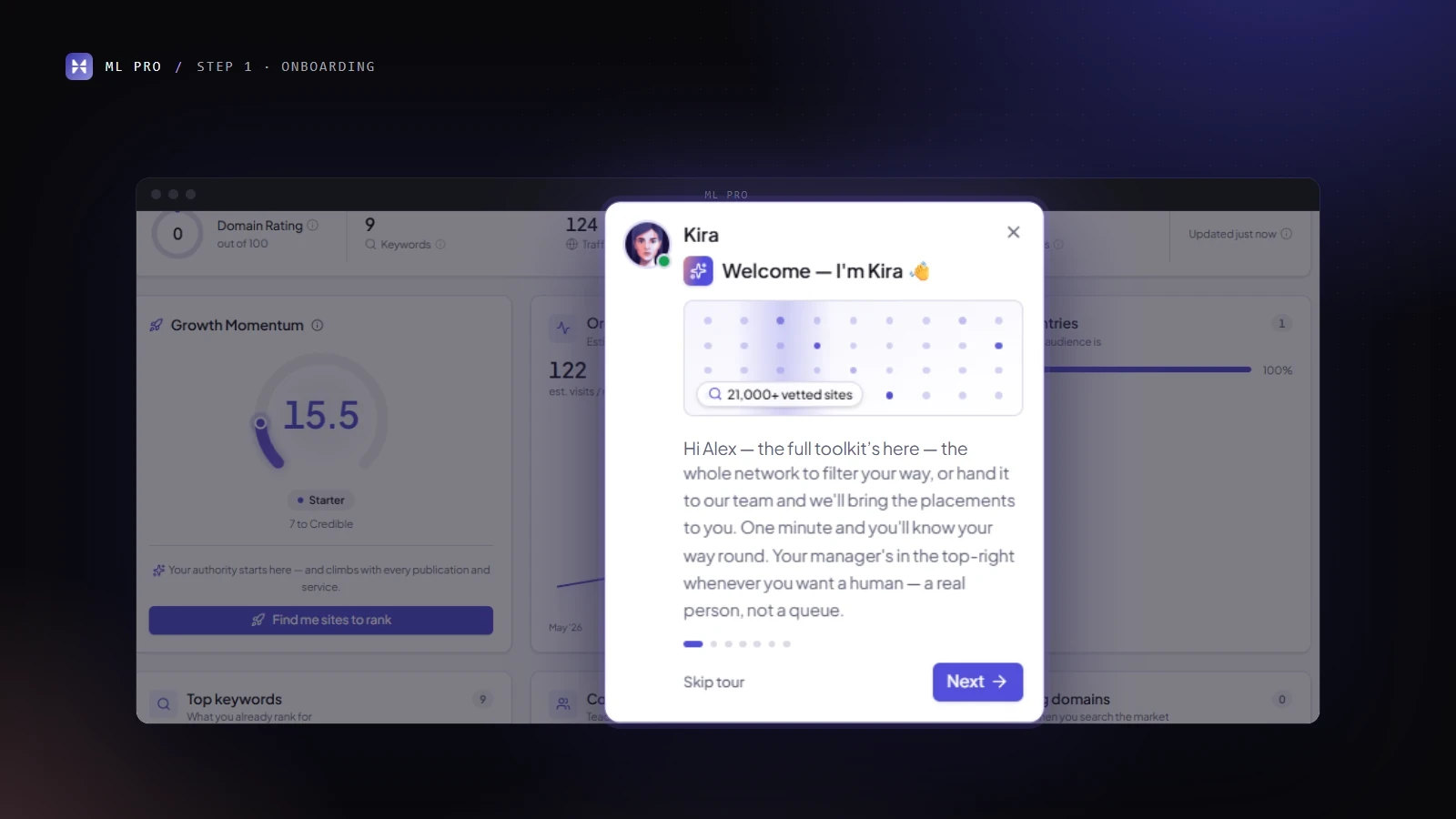
Kira then gives you a tour of your first project. It takes about two minutes and is worded differently for business owners and SEO pros.
You can skip it or replay it later. At the end it gives you a choice of next step: browse the network, let Kira find placements, request link insertions, or look around on your own.
If you invite teammates, each of them gets their own Kira-led welcome. Nobody on your team has to sit through a screen-share to learn the tool.
Step 2: The platform does the research you'd normally do first
The brief for a new project usually starts with an Ahrefs tab, a competitor list and a guess at the niche. ML Pro does that part for you:
Metrics: DR, keywords, monthly traffic, referring domains and backlinks, plus a 12-month organic trend, top countries, top keywords, competitors and your existing referring domains. Data comes from Ahrefs and DataForSEO and usually arrives in about 20 seconds.
"About your site": an AI-written business profile you can edit. This matters more than it sounds, because it's what Kira matches against.
Language, niche and categories: detected automatically.
Blacklist: add any domains you never want to be offered, per project. That covers competitors, sites you've burned before, and the one your CMO "has a feeling about".

Step 3: Kira explains why each website fits
This is the part we're proudest of. You don't get filtered rows. Kira reads your business profile, your metrics and the whole network, and returns site cards with:
a 0-100 match score
DR, traffic and price
a plain-English reason the site fits your business
"What I like about Kira is that she tells you right away how well a website matches your project. A site with DR 40 and a match score of 100 can do more for you than a DR 80 site with a match score of 0." - Dušan, Head of Off-Page SEO
If you're new, one click on "find me the best sites" is enough. If you've been doing this for years, you can steer Kira by language, country, DR, traffic, budget and free-text guidance, such as "only sites that cover B2B payments, no general business news".
Kira skips sites that already link to you, sites she has already suggested and anything on your blacklist. Every search is saved, so you can come back to it next quarter.
Kira works from a network of 20,000+ vetted websites. It includes the niches many vendors quietly avoid: casino, betting, forex, crypto, CBD and loans.
If you'd rather search by hand, the full database is still there. It has Ahrefs, Majestic (TF/CF) and Moz (DA/PA, spam score) metrics, filters for every range and a direct domain lookup.
We remove a website as soon as it stops meeting our standards, and the websites that stay usually accept orders within about 24 hours.

Want niche edits instead? Tell us the page and the anchor
Sometimes you don't want a new article. You want your link inside one that already ranks. For that, ML Pro has link insertions as a service:
Tell us which pages you want to promote and which anchors you accept.
Add requirements if you have them: topic, minimum site DR and traffic, minimum article traffic, price range.
A live dial shows how each requirement affects choice and speed. Ask for DR 90 at €20 and you'll see the dial react before our team has to tell you.
Our team looks for real, ranking articles and sends offers to your basket. Each offer shows the site, its metrics, the exact article and its traffic, the anchor and the price.
You approve or reject each offer one by one, and you can pause or stop the request at any time.
The first insertion usually arrives within 2 business days, and sometimes the next day. Speed depends on your requirements: the more room you give us, the faster we deliver, which is exactly what the dial shows.
Links are dofollow and indexed, and they stay live for at least 12 months. We record the article's traffic at the moment your link goes in, so you can check that the numbers on the offer were real.
Step 4: Build the order as hands-on as you like
This is where ML Pro differs most from a self-serve marketplace. You decide how much of the work stays with you.
Content, per placement: choose Content by Motherlink (writers we've worked with for years write it from our brief), Content by me (upload a doc or paste a Google Doc link), or Let my manager decide.
Briefs you write once: copy requirements from one placement to the next, or apply one brief to the whole basket. Attachments are copied too, and the language adapts to each website. Ten placements take about as long to brief as one.
"Let my manager decide": choose it on any placement and give us nothing. Your manager handles the article and the strategy for a flat fee. One click applies it to the whole basket, and ML Pro remembers the choice for next time. If you want even less work, your manager can prepare a full campaign of websites and briefs for you to review, approve and pay.
Your manager isn't a ticketing system with a first name. Our account managers each have 7–8 years of SEO experience, and they sit in the same chat as Kira.
Press "Talk to my manager" at any point, and Kira hands over on her own when a question is about billing or custom strategy. Every order and campaign also has its own chat thread, so you never have to dig through email for "the one where we agreed the anchors".
"Kira is great at the first 80% of the job. The other 20% is the conversation: which anchors your legal team will accept, which sites your competitor is already on, what to do when the budget changes mid-month. That part still needs someone who has done it for years." - Franciso, Account Manager at Motherlink

Step 5: Pay once, then watch every link go live
Billing: you enter your company details once, at your first checkout. EU VAT numbers are validated automatically, and an AI check catches typos before they reach an invoice. Your workspace has one shared prepaid balance that shows what's available, reserved and spent, with PDF invoices.
You can top up by bank transfer or card. Owners decide who on the team can handle payments.
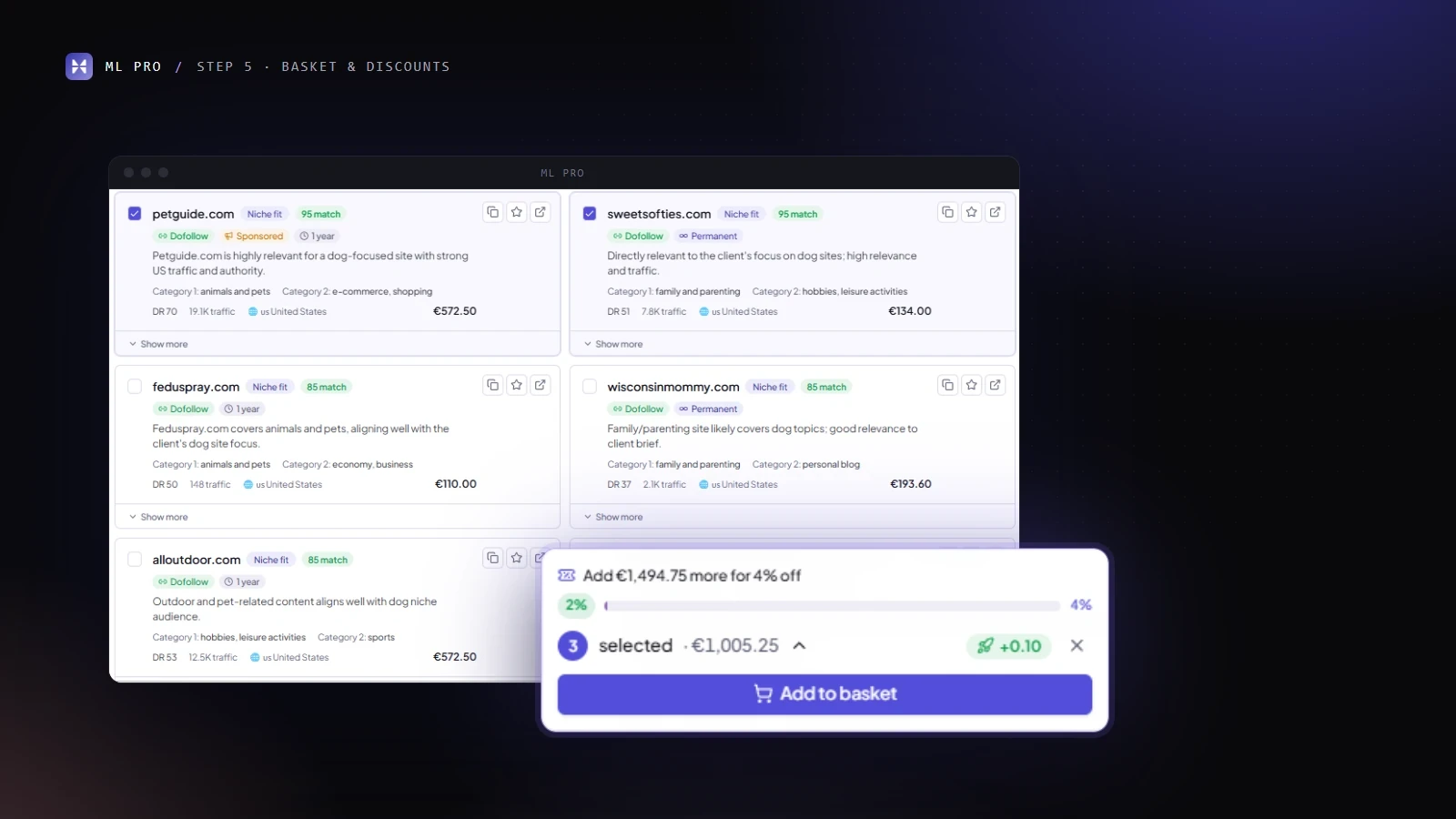
Discounts: a progress bar in the basket shows how close you are to the next volume tier. The best available deal is applied at checkout, and every order shows exactly what you saved.
Tracking: each placement moves through Order received → Writing your article → Placing your link → Published. You approve articles and live links on a content board, one by one or in bulk.
Basket prices are checked live. If a price goes up, the change waits for your approval; if it goes down, the new price applies automatically.
Every website confirms in advance that the article will be indexed and the link will stay dofollow, and we check indexation after publishing. The Publications page lists every live link across all your orders, and any order exports to CSV for your monthly report.
For agencies and in-house teams, Campaigns group orders under one goal, with target links, a timeframe, a progress ring, average DR, spend and a dedicated chat. Workspaces share projects, favourites and the balance across the team.
Step 6: See what your links are doing
Once links go live, ML Pro keeps your project metrics up to date. You get regular emails that compare your DR, organic traffic, keywords, referring domains and backlinks with where you started, with up and down arrows so you can read them in five seconds. In the app, the "Show growth" view does the same.
Growth Momentum (experimental) turns that into one 0–100 authority score. It moves through nine stages, from Foundation to Powerhouse, and before you order it previews the gain each order could bring. We show it as an estimate, because anyone who promises you rankings is selling something other than SEO.
What's next for ML Pro
The next release brings the right websites to you. We're testing it now, and it will reach clients over the coming weeks:
Top matches and a New tab: a standing shortlist of up to 100 websites that fit your project, plus the websites that just joined the network or opened up to your niche. A digest email ("3 new sites for yoursite.com") will tell you without you having to log in.
Recommendations tuned to how you work: Kira will learn from what you order, favourite and filter, and every card will say why it's shown, for example "Your usual budget". You'll be able to see what was learned, delete any of it, or switch it off.
Further out, we're building managed off-page SEO and Digital PR into the platform. You'll also be able to connect your own AI assistant, starting with Claude and followed by ChatGPT and Gemini, and use it to check your balance, search the market or follow an order with a secure sign-in and no API keys.
A good link building platform shouldn't make you do the research it could do itself, and it shouldn't leave you alone with a bot when the question gets hard. ML Pro does the first part automatically and keeps a person within one click for the second.
Related: Link insertions / niche edits service, Guest Post Outreach Service